Do you mean to add to the PATH for all files that are "not found"?
• 0 views
•
link
Hello
I want to annotate a peakfile
But
Why does the following command for annotate give the following error?
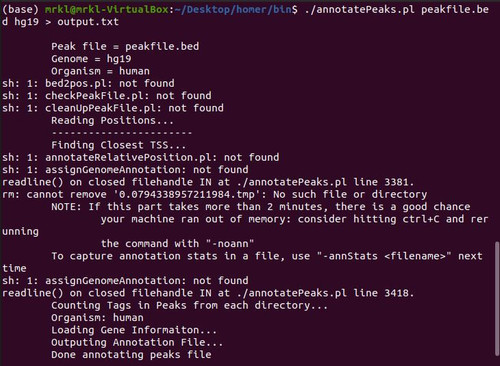
While I added the executable path. According to the figure below

Output file

this script calls for annotateRelativePosition.pl https://github.com/c-guzman/cipher-workflow-platform/blob/master/bin/homer/bin/annotatePeaks.pl#L1923 which is not in your PATH. https://opensource.com/article/17/6/set-path-linux
The problem was that when annotatePeaks.pl wanted to call other functions in other programs from within the program, it could not do so despite placing the bin folder path. And we have to make all the contents of the bin executable globally.
Follow these steps to solve the problem:
1: In the terminal, write the following code:
gedit .bashrc
2: In the opened text editor, write the following code at the bottom of the page:
export PATH = / home / Computer username (mrkl) / ..... / bin
Then save the changes
3: Enter the following code in your terminal:
gedit .profile
In the opened text editor, write the following code at the bottom according to the path of the bin folder and then save
export PATH = / home / Computer username (mrkl) / ..... / bin
.bashrc, there is no need to edit your .profile (whatever that file is - I've heard of .bash_profile, but not .profile)PATH=$PATH:/new/location. In other words, add to $PATH, don't overwrite it.#3 is extremely important. Don't ruin your shell by overwriting the PATH variable.
Log in to answer this question.