Hi Wayne! Thanks for your elaborate response. I have now looked at the tools and it seems that they're all based on existing proteins. I failed to mention (corrected now), that this is for a custom protein (my own). Hence, it is not in any databases yet. Any such tools for that purpose?
Hi!
I'm looking for a tool that can convert the 3D protein structure of a custom PDB file (not in any databases) into a 2D representation. So that the protein is laid out flat and "opened up" so you can see all loops, beta sheets and helices.
Is there any such software out there?
Thanks!
2 answers
There's a number of options available depending specifically on what you seek:
PDBsum has the entire Protein Data Bank, as well as some AlphFold results, represented as a pictorial database. As highlighted under the 'Displaying Secondary Structure' at Proteopedia's page on the topic of 'Secondary Struture', PDBsum includes that information. For example, if you go to the Protein tab of 1ema, you'll see a small thumbnail of a wiring diagram displayed on the right side. You can find a link to the right of that to open a larger PDF file of that image. For structures with multiple domains, you'll see the wiring diagram split out per domain. For structures not yet publicly available, you can click on 'Generate' from the left sidebar on the PDBsum main page, to get to the 'Generate' page that lets you submit your own PDB file. If you rather use it locally on your own machine using your own PDB file, from right side of either the main page or the 'Generate' page there's a way to download the 'Standalone version of PDBsum Generate'.
PTGLweb is a protein topology graph library web server. Read about it here.
ProLego server is described in Khan et al., 2018 'ProLego: tool for extracting and visualizing topological modules in protein structures' Also be sure to look at the ProLego documentation because in addition to the ProLegoDB, there is a spot to generate a topology 'By Uploading a File'. (see 'Notes' below.)
Notes about Khan et al., 2018 'ProLego: tool for extracting and visualizing topological modules in protein structures' and the ProLego server in the hopes they help others be careful & use the correct resources, perhaps carefully share code and servers better so that others may use the sites and tools you create. Or maybe spurs the authors or BMC Bioinformatics to update / fix things now or BMC Bioinformatics better set editorial policies in the future, or reviewers to make sure policies encouraging sharing of the science are adhered to or that what is backing the paper can be assessed:
While the paper makes this look like a nice tool. Accessing it and what it can do is anything but easy. In fact a few years after publishing it, it is practically a minefield. Starting with the sites listed under 'Availability and requirements' section in Khan et al., 2018 'ProLego: tool for extracting and visualizing topological modules in protein structures'. Trying to use either the links 'Project home page' or what is listed just above as 'Studied protein datasets' listed in the project site seemingly hijacks my browser to a multitude of varying URLs that say there's a security issue and that I need to install their extension. The correct link seems to be http://proteinlego.indirag.org/ and that should have been in the paper or updated by the publisher.
Circling back to the 'Availability and requirements' section, this should be where at least some of the code for what is billed as a "pythonic" solution should be shared. There are much better ways to archive share code that helps insure their utility going forward. And that provides adaptability to people looking to use your code and build on it. Please look into GitHub and other repositories or OSF.
Clicking on 'Data' in the navigation bar gets a server error. Were these the referred to "Studied protein datasets ... listed in the project site" under the 'Availability of data and materials' section?
Entering 1ema at Compute ProLego Topology from Proteins [PDB] under 'Get PDB from RCSB' leads to 'Server Error (500)'.
Yes, two of the three mention uploading your own protein. (Although, I'm not confident ProLego server actually works now. It was supposed to do that functionality at one time.) PDDsum let's you use 'Generate' on the server. Or you can even download it. I put that in the post already & for further emphasis I just highlighted some of the appropriate parts.
Ah, you are right! Thank you.
is it possible that you are still in this community? I used PDBSum1, it gives the different second structures compared to what chimera computed. And PTG and ProLEGO are both not work, can you tell me what software you used at last. Thanks a lot!
I think that gets into more into some sort of 'quality' assessment when you say it doesn't match a particular resource. For example, the basis for the calculations used and settings underlying could be a factor here. Most use DSSP as I understand. For example, that seem to be what Chimera is using, see here. It may indeed also factory in specifically what version of DSSP is in use, see [here](https://github.com/PDB-REDO/dssp.
Importantly, your addition here should probably be another question under its own topic. One thing you could also make clear there is the scope of your question or how it differs from here? What is your real goal? And how do the solutions posted in this thread address that or not? For example, does iCn3D work. And how is using Chimera not meeting your needs if you say that is better than PDBSum?
Importantly, this topic, as I understood it, was about generating wiring diagrams. Yours sounds like it may just be about secondary structure more generally? If you just want secondary structure assignments and not images, there's a lot more options.
You can use Pro-origami, which is specifically designed for this purpose:
Alex Stivala, Michael Wybrow, Anthony Wirth, James C. Whisstock, Peter J. Stuckey, Automatic generation of protein structure cartoons with Pro-origami, Bioinformatics, Volume 27, Issue 23, December 2011, Pages 3315–3316, https://doi.org/10.1093/bioinformatics/btr575
Unfortunately the webserver is no longer available as the last of my co-authors to retain a University of Melbourne affiliation recently moved to another university, so the server was shut down. However you can still download the software to run yourself (on Linux) from:
https://sites.google.com/site/alexdstivala/home/pro-origami
I also maintain a list of related software on that page (to which I just added ProLego, which I was not previously aware of).
I made it easier to try Pro-origami without needing to install anything or register. Works right in the browser in a Jupyter session provided by the MyBinder service. Go here and click the 'launch binder' badge to get started. The Pro-origami software is installed & everything is set up. A Jupyter notebook document that comes up once the session starts walks you through using Pro-origami there and how to use it with your structures of interest.
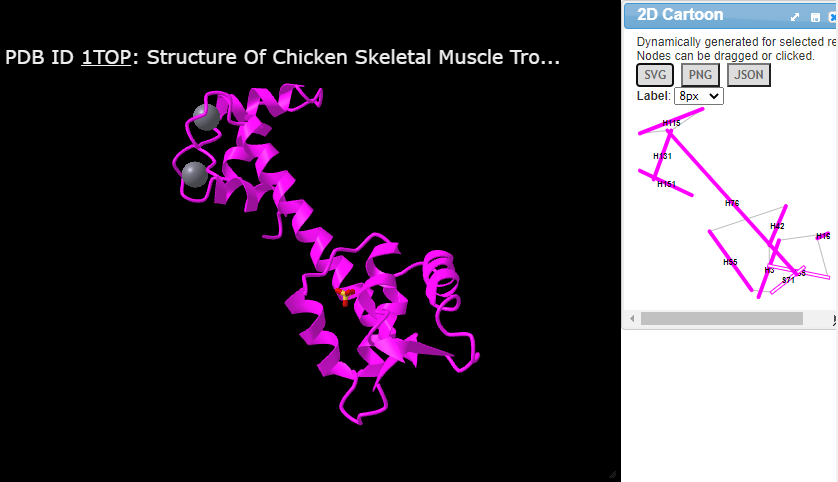
You can also try out iCn3D. After you load your custom PDB via the menu "File > Open File > PDB Files", you can click the menu "Analysis > 2D Cartoon > Helix/Sheet Level" to get the projection of secondary structures from 3D to 2D. Here is one example with the URL https://structure.ncbi.nlm.nih.gov/icn3d/share.html?5iZSHNbXcJisp7gQ6 :

TIP: First you need to use the drop-down on the far left to change from 'Simple Menus' to the option of 'All Menus' in order to have the 'Analysis' menu show the '2D Cartoon' option.
Log in to answer this question.