Hi all,
I have to run the same program for multiple files.
I would like to know if I can do that using a loop?
Many thanks, friends!
 Files: SRR10345445_1.fastq SRR10345445_2.fastq SRR10345446_1.fastq SRR10345446_2.fastq
    TrimmomaticPE -threads 30 \
       SRR10345445_1.fastq SRR10345445_2.fastq \
       SRR10345445_1_PE.fastq SRR10345445_1_SR.fastq SRR10345445_2_PE.fastq SRR10345445_2_SR.fastq \
       HEADCROP:12 ILLUMINACLIP:TruSeq3-PE-2.fa:2:30:10:2:keepBothReads \
       SLIDINGWINDOW:4:20 LEADING:5 TRAILING:5 MINLEN:40

    TrimmomaticPE -threads 30 \
       SRR10345446_1.fastq SRR10345446_2.fastq \
       SRR10345446_1_PE.fastq SRR10345446_1_SR.fastq SRR10345446_2_PE.fastq SRR10345446_2_SR.fastq \
       HEADCROP:12 ILLUMINACLIP:TruSeq3-PE-2.fa:2:30:10:2:keepBothReads \
       SLIDINGWINDOW:4:20 LEADING:5 TRAILING:5 MINLEN:40
3 answers
You just need to loop over one filename, pair the second file to it, and then feed these in to your command. There will be more practical examples elsewhere on the forum, but the general form will be this:
for R1 in /path/to/files/*_1.fastq ; do
  R2="${R1%_1.fastq}_2.fastq"
  TrimmomaticPE -threads 30 "$R1" "$R2" "${R1%.*}_PE.fastq" "${R1%.*}_SR.fastq" "${R2%.*}_PE.fastq" "${R2%.*}_SR.fastq" ...
done
Haven't tested this, so there might be syntax errors.
$ find . -type f -name "*_1.fastq" | while read line; do echo $line ${line/_1/_2} ; done

./SRR10345445_1.fastq ./SRR10345445_2.fastq
./SRR10345446_1.fastq ./SRR10345446_2.fastq

$ parallel --plus echo {} {=s/_1/_2/=} ::: *_1.fastq

SRR10345445_1.fastq SRR10345445_2.fastq
SRR10345446_1.fastq SRR10345446_2.fastq
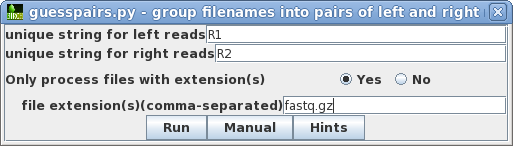
BioLegato in the BIRCH system gives you an easy graphical interface for working with groups of fastq files for most tasks involving sequencing reads. You select your reads and tell guesspairs.py how to pair files together
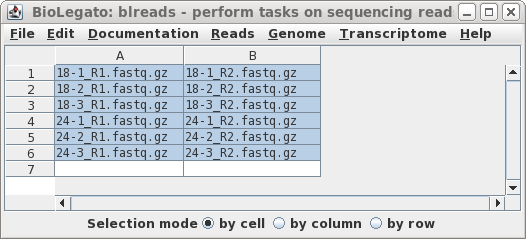
Guesspairs will open a new window with your paired files
Now, run Trimmomatic, or any other program included with BioLegato, and the output pops up in a new window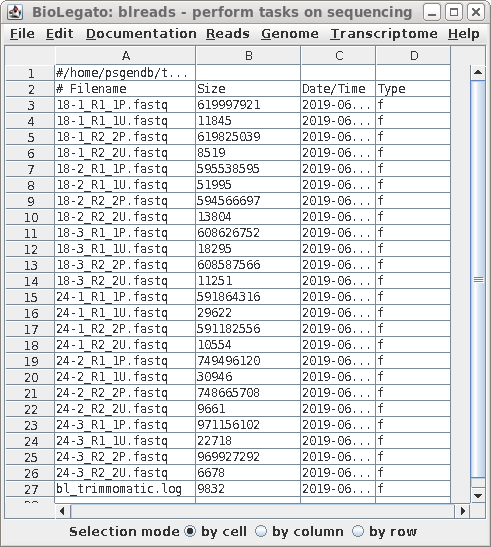
To do further steps, select files in the output window, and run the next program from Biolegato.
BIRCH 3.80 has just been released, with numerous improvements on working with NGS sequencing reads, BLAST searches and phylogenies.
Log in to answer this question.