Thank you for sharing.
• 0 views
•
link
I have called variants for our RNA-Seq data following the best practice as mentioned. I am unable to interpret some of the entries in the vcf files. I am pasting the examples below.
chr1 1288459 . TG T 283.73 . AC=1;AF=0.500;AN=2;BaseQRankSum=-2.064;ClippingRankSum=-0.268;DP=50;FS=0.000;MLEAC=1;MLEAF=0.500;MQ=35.71;MQ0=0;MQRankSum=0.268;QD=5.67;ReadPosRankSum=-0.755 GT:AD:DP:GQ:PL 0/1:25,23:48:99:321,0,344
Here, it states that the variant is heterozygous with the DP 48 and ref count AD 25 and alt count AD 23. Quality looks good and the confidence GQ is also very high.
Why are two nucleotides mentioned in REF column? How is it heterozygous if its T in REF and T in ALT columns?
I also find the similar entries with more than two nucleotides in the REF column.
chr1 160209736 . AAGG A 591.52 . AC=1;AF=0.500;AN=2;BaseQRankSum=-0.804;ClippingRankSum=-0.291;DP=44;FS=0.000;MLEAC=1;MLEAF=0.500;MQ=36.53;MQ0=0;MQRankSum=-0.222;QD=13.44;ReadPosRankSum=3.505 GT:AD:DP:GQ:PL 0/1:6,38:44:7:628,0,7
Lastly, the same behavior is also observed the other way around.
chr1 1153898 . C CT 66.73 . AC=1;AF=0.500;AN=2;BaseQRankSum=-1.787;ClippingRankSum=-0.208;DP=77;FS=0.000;MLEAC=1;MLEAF=0.500;MQ=45.50;MQ0=0;MQRankSum=1.633;QD=0.87;ReadPosRankSum=-0.659 GT:AD:DP:GQ:PL 0/1:50,23:73:99:104,0,547
Can anyone shed some light on such entries in VCF?
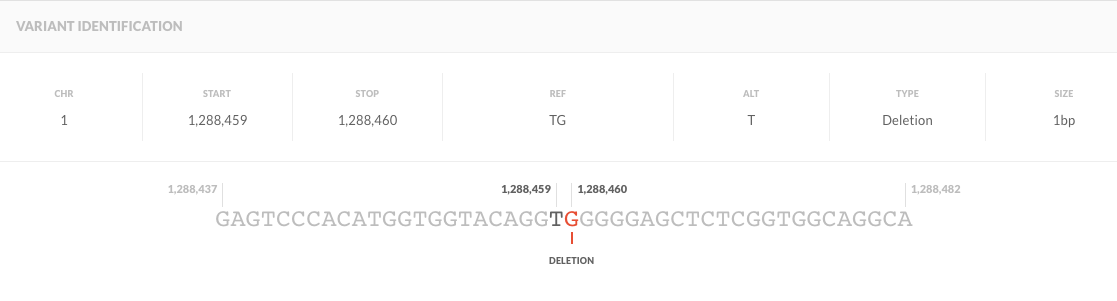
This is just how the VCF format specifies insertions and deletions -- so your first example actually looks like this. It's a T/TG heterozygous.
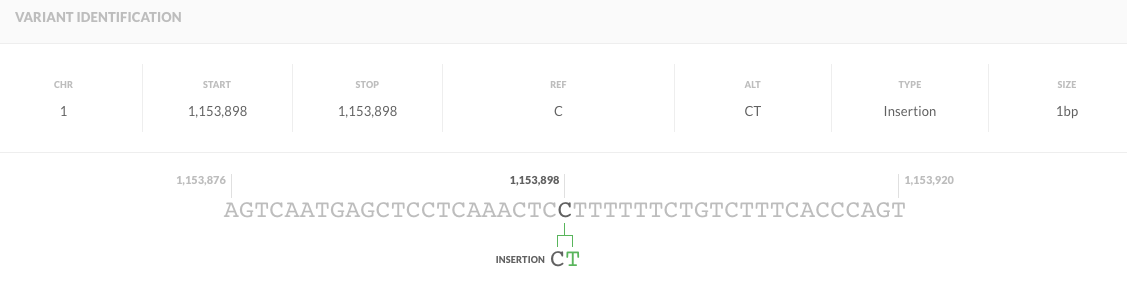
Your last example is an insertion, which looks like this:
Check out the VCF specs for more information. Hope that helps!
Also, if you continue having problems conceptualizing these sequence variants, you can try the SolveBio Variant Explorer https://www.solvebio.com/variant-explorer. It's free to use, just sign up for solvebio and then you can literally copy and paste a line from your VCF file into the Variant Explorer search bar and it'll show you what the sequence variant actually looks like.
Thank you for sharing.
I tried using variant-explorer. I am able to visualize the insertion like in the second figure, but unable to view the deletion. What was the input you provided to obtain the table for deletion?
Did you try copy and pasting the exact line from your VCF? The search bar will automatically change the input to be right (you'll have to copy and paste it from the VCF file itself from a text editor -- sometimes the formatting gets messed up otherwise) .
If you want to input it manually, put in
Chromosome 1, start 1288459, stop 1288460, allele T
Like this:

We're still working on the variant explorer - the next version is going to be a lot more flexible in terms of the format of the input it takes. Let me know if there's any problems still.
The input you mentioned above works fine. But, giving the entire line of vcf as input does not auto format and throws an error.
We had a few technical issues with the variant explorer over the past few days.
Here's a direct link to your variant: https://www.solvebio.com/variant-explorer/chr1:1288459-1288460:T
Hope that helps!
Log in to answer this question.
"Why are two nucleotides mentioned in REF column? " because that's a deletion of a G after the T at position chr1:1288459